Live truck tracking: one link for your customer.
They see the truck. Not the driver.
TruckTrace gives your customer a link to follow one of your trucks on a map until the date you set, with no account, no app and no GPS device on the truck. The positions come from your driver's phone, and the link ends by itself.
- Pickup Zaragoza
- Truck Near Teruel
- Delivery Valencia
- Last updated 11:52
No driver name, no speed.
In short
- TruckTrace is a live truck tracking link: you create a trace for one of your trucks and your customer follows it on a map.
- Your customer needs no account and no app, and the truck needs no GPS device: the positions come from your driver's phone.
- €1 per active day from your wallet. The link ends on the date you set, the customer never sees the driver, and the positions are deleted 30 days after the trace ends.
What exactly is TruckTrace?
TruckTrace is a time-limited permission to watch one truck. You create a trace, and CargoPay issues a single link. Anyone holding that link sees the truck on a map until the date you set, or until you end the trace yourself.
The positions come from the phone your driver already uses for DriverLog: one at every loading and unloading the driver reports, and one every few minutes while the driver has live sharing turned on and the page open.
TruckTrace is not a telematics box. There is no device to fit, no ETA prediction, no route-deviation alert and no geofencing. It answers the question your customer asks most: where is my truck?
What changes for your customer?
Without a tracking link, "where is my truck?" is a phone call to you, and then a phone call from you to the driver. With TruckTrace, your customer opens the link.
| Without a tracking link | With TruckTrace |
|---|---|
| The customer calls to ask where the truck is | The customer opens the link and sees the truck on a map |
| The dispatcher calls the driver to answer the customer | Nobody has to call the driver |
| A tracking portal needs a login for every customer | One link, no account, no password |
| Following a truck needs a device fitted to it | The positions come from the driver's phone |
| A shared location keeps running after the delivery | The link ends on the date you set, by itself |
| The customer can see who is driving | The customer sees a plate, a map and a time, never the driver |
Where do the positions come from?
From your driver's phone, in two ways. One needs nothing new from the driver; the other is a switch only the driver can turn on.
DriverLog reports
Automatic. Every report the driver files at loading and unloading adds a position. On a typical run that is two points on the map: where the truck loaded, and where it unloaded. It answers "has it been picked up?" and "has it arrived?".
Live sharing
The driver's choice, on their DriverLog page. While the switch is on and that page stays open, the phone sends a position every few minutes and your customer sees the truck move along the road. Closing the page or the browser stops it, and it starts off again the next day. Only the driver can turn it on, and they can turn it off at any moment.
The TruckTrace app for Android
The app keeps sharing with the screen off and the app closed, sending the phone's position about every 10 to 15 minutes while sharing is on. The driver can pause it at any time. Drivers who do not install it can still share live from their DriverLog page, but only while that page is open.
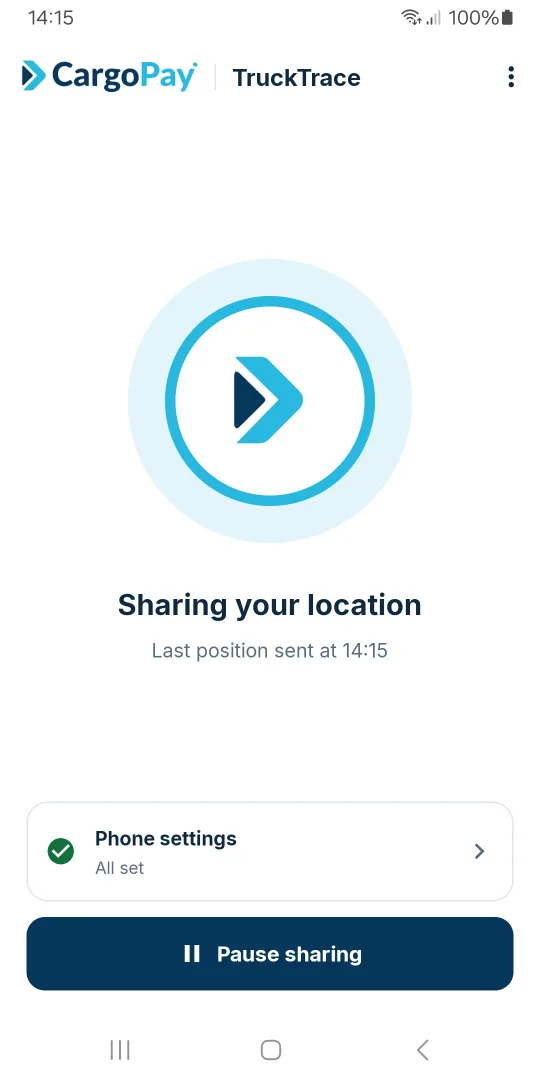
Sharing
The home screen while sharing, with the time the last position was sent.
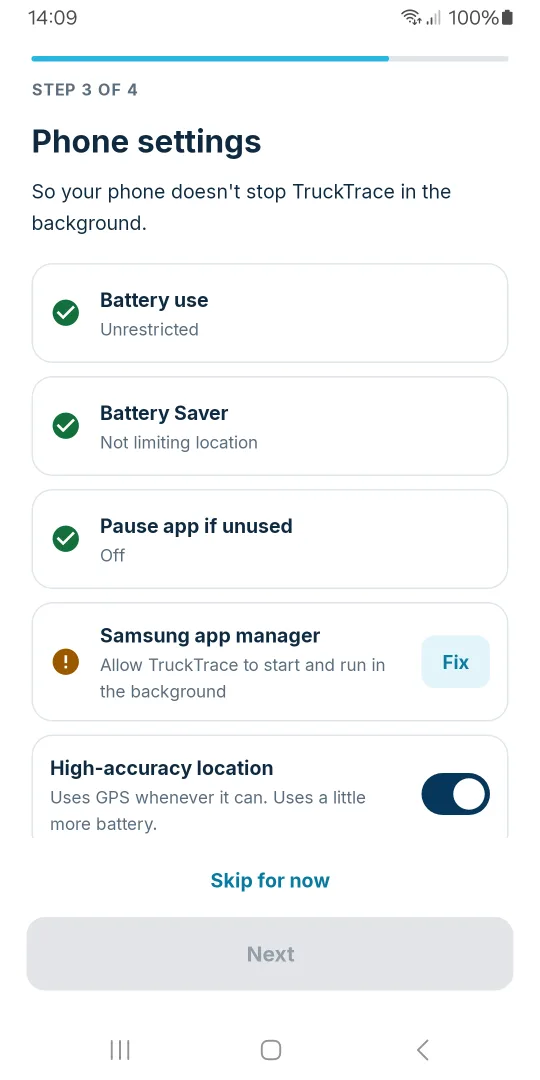
Phone settings
Checks that the phone will not stop the app in the background.
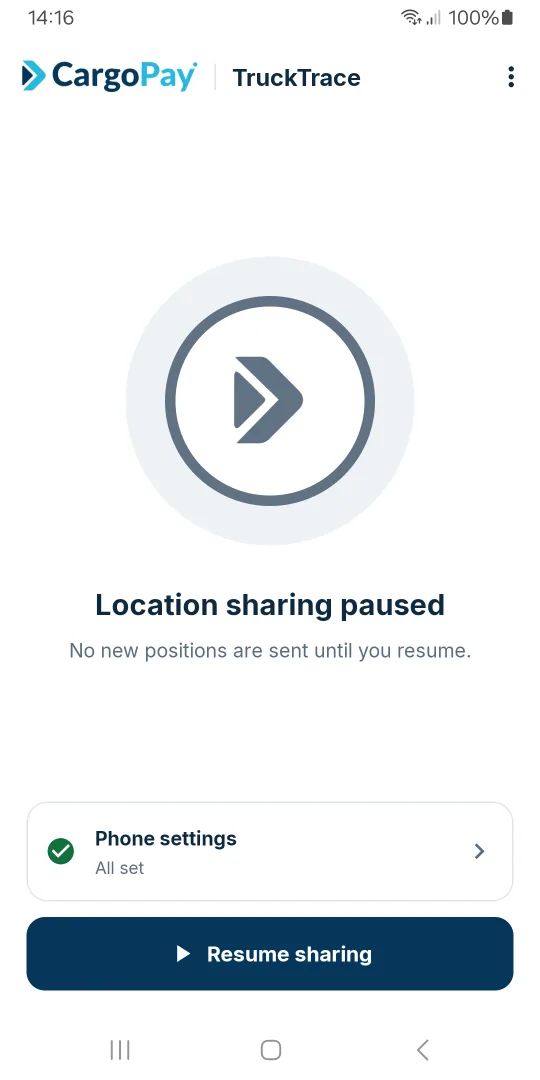
Paused
The driver can pause sharing at any time. No positions are sent until they resume.
What does your customer see?
One page titled "Where is my truck?". It shows the truck and nothing about the people or the business behind it.
The truck and its trail
The latest position, every earlier one behind it, and the place name where known.
When it was last seen
A last-updated time, with a warning when the reading is over an hour old.
The route, if you linked one
Pickup and delivery markers from the shipment, and its reference.
It refreshes itself
Every 30 seconds, so your customer can leave the page open.
Never the driver
No name, no phone number, no speed.
Never the rest of your business
Not your company, your other trucks or your other traces.
The page tells your customer that a truck standing still may be resting, loading or out of signal, so a still marker reads as part of a normal run.
What does it cost, and what are the limits?
€1 per active day, taken from your CargoPay wallet when the trace is created, for the whole period up to the end date. There is no monthly fee, no charge per position and no charge for your customer opening the link.
- A refused trace costs nothing: if the truck already has a live trace or no active DriverLog token, nothing is charged.
- One live trace per truck. Two customers following the same run can share the same link.
- The end date is fixed once the link is sent; a later date means a new trace and a new link.
- Ending a trace early stops the link at once and is not refunded.
- The recorded positions are deleted 30 days after the trace has finished.
Why track the truck where your fleet already is?
A separate tracking tool needs its own list of trucks, its own device on each one, and its own login for each customer. TruckTrace uses the trucks and the driver reports you already have in CargoPay.
It starts from your fleet
A trace follows a truck you registered under Vehicles. Nothing outside your fleet can be traced.
The positions come from DriverLog
Every report your driver files at loading and unloading adds a position to the trace, with no extra step.
The shipment draws the route
Link the trace to a shipment and its pickup and delivery points appear on your customer's map.
In your customer's language
The map page opens in English, Spanish or Romanian.
Frequently asked questions about TruckTrace
Send your next customer a link
Register your truck, issue its DriverLog token and create a trace for one run. Your customer opens the link and sees the truck.