Transport quotation.
Post one shipment, receive quotes from verified carriers.
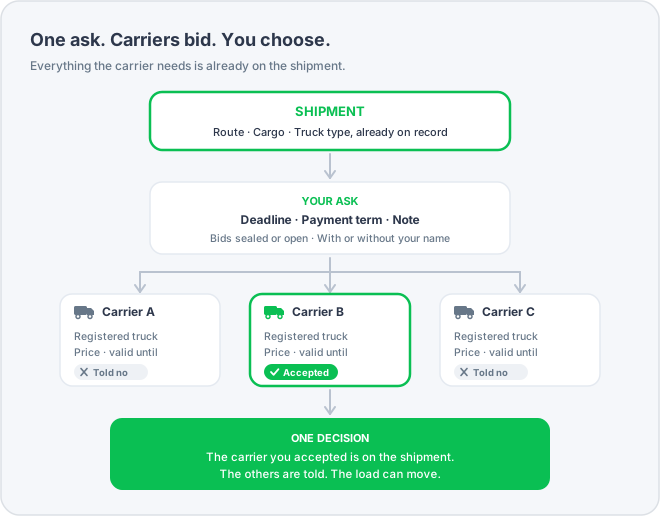
Getting a transport quotation on CargoPay runs in one step: you open a shipment you already hold for bids, set the deadline and the payment term, and verified carriers send you their quote. You accept the quote you want. The shipment is never entered twice.
In short
You request a price on a load you already hold. Carriers respond. You choose. The carrier you chose is assigned to the load, the other bidders are notified, and the transport documents and the payment continue from the same record. Shippers request and decide, carriers bid, and no one bids on their own load.
What you post
Three items. Everything else stays on the load, and that is what carriers see.
Deadline for bids
Bids are accepted until then. After that, the request closes automatically.
Payment term
On delivery, against the documents, or a fixed number of days. Carriers price against the term, so it is not renegotiated afterwards.
A note
Anything a carrier should know before pricing the run.
Everything else comes from the load
Where it is going, when, what it is, how heavy, what truck it needs: carriers see all of that on the shipment you already hold. There is no second form, and the bid a carrier makes and the load you agreed cannot differ, because they are the same record.
Two choices that change who bids
Before you post, you decide what other companies get to see. Whatever you choose, on your own request you see everything.
Sealed or open bidding
Sealed, the default: carriers see the load and nothing about the bidding. Not how many bids there are, not the lowest price. Each carrier sees its own bid only.
Open: carriers see how many bids there are and the lowest price so far.
Open bidding tends to lower prices in full view, and some carriers prefer not to bid where they can be undercut in public. With sealed bidding there is no price to beat, so the first bids arrive more easily. You choose, for each load.
With your company name or without
Without: carriers see the load, the terms and the deadline, and price them. Your company name stays off it.
With: your company name is on the request, and a carrier can look you up before bidding.
This hides you from carriers. It never hides carriers from you: on your own request you always see who placed each bid.
How it runs
Four steps. The load is the first one and the last one.
Open a load for bids
Choose a load you have confirmed, set the deadline, the payment term and your two choices, add a note if you wish, and post. Until you post, only you can see it.
Carriers bid with a truck
Every bid includes a price, how long that price stands, and a truck from the carrier's own fleet. A carrier without a suitable truck on its books cannot bid at all. This keeps double brokerage, load theft and fraud out of the process.
You compare and choose
You see every bid: the price, how long it is valid, who made it and with which truck. Accept the one you want. It does not have to be the lowest.
The load moves on
The carrier you accepted is assigned to the load. The transport documents and the payment request are created from that same record, with the price and the term you agreed.
Once carriers can see your request, its terms stay as posted, because the bids were priced against them. If you need a different deadline or payment term, withdraw it and post again.
Accepting settles it
You accept one bid. The platform handles the rest in one step.
Your carrier is notified
First, before anyone else, so they can start planning.
The other bidders are notified
Each one, without you writing a single email.
The request closes
It is no longer open. No late bids, no second round.
The load can move
While a load is out for bids it stays put. Accepting a bid is what lets it move.
No more searching for the email with the final price. The bid you accepted is recorded on the load, and that is what the documents and the payment use.
Who does what
Shipper accounts request and decide. Carrier accounts bid. A company can hold both kinds of account, each with its own role. The bid always comes from the company that will run the load, with a truck it has registered. This keeps double brokerage, load theft and fraud out of the process.
If you send freight
You can
- Open any of your confirmed loads for bids
- Set the deadline, the payment term, sealed or open, named or anonymous
- See every bid, whoever made it, and accept the one you want
- Decline bids one by one
- Withdraw the request at any time before you accept
You cannot
- Bid, on anyone's load
- Change the terms once carriers can see them
If you move freight
You can
- Browse every open transport request
- Bid with a price, how long it stands, and one of your own trucks
- Change or withdraw your bid until the shipper decides
- Are notified at once when you have won or lost
You cannot
- Post a request or accept one
- Bid without a truck on your books that fits the load
- See other carriers' bids when the shipper kept them sealed
How it connects
Asking for a quote is one step in the life of a load. Like every other step, it works from the same record.
The load itself
Every request starts from a load you hold and ends on it. See how shipment management keeps the route, the cargo, the truck and the history in one place.
The verified network
Only admitted companies can bid, so every carrier quoting you was checked before it could quote. What verification covers, and how to look a company up.
The payment
The payment term you set on the request is the term the payment request is raised on, for the same load.
The user guide
The full guide is inside the app once you are registered. The FAQ answers the questions asked most before that.
Post the load once. Decide once.
Join the verified network, confirm a load and open it for bids.
Or see the other services the platform offers, starting from the load.